
Netsody 1.0.0-rc.4 removes the wait on the first access through a gateway, extends the TCP fallback to the case where both devices are in networks that block UDP, and improves throughput by up to 52% on direct connections and by up to 57% over the TCP fallback.
No More Waiting on the First Access Through a Gateway
Resources make systems reachable that cannot run the Netsody agent themselves, such as a subnet, a single address, or a private service behind a gateway node. Establishing the connection to a gateway takes a moment, and an access that needs it has to wait for it.
With rc.4, connections to gateway nodes are created in advance and kept even when they are not in use. An access through a gateway no longer has to wait for a connection.
Domain resources get the same treatment. For a domain resource, the DNS query is forwarded to the gateway, and the response is used to set up the routing. rc.4 resolves domain resources in advance and keeps the result up to date, so an access no longer has to wait for the lookup either. Wildcard domain resources are excluded, because their names are not known in advance.
TCP Fallback When Both Sides Block UDP
Netsody’s transport is based on QUIC and therefore on UDP. In networks that block UDP, Netsody falls back to HTTP/2 over TLS through a super peer. This is the TCP fallback.
With rc.4, the TCP fallback also works if both devices are in a network that blocks UDP, as long as both are connected to the same super peer.
rc.4 also fixes the TCP fallback on Windows, where it was broken for a device with no global IPv6 address in a network that blocks UDP/443.
Higher Throughput
After rc.3 made relayed connections faster, rc.4 continues with the data path in general. Throughput improved by up to 52% on direct connections and by up to 57% over the TCP fallback. There is nothing to configure.
More Conservative Path Probing
When establishing a connection to a peer, Netsody tries the possible paths more conservatively. This reduces the noise on the network, both from the initial connection attempts and from the search for better alternative paths afterwards. It continues the work from rc.2, which introduced probing at a steady pace with back-off.
Who Can Reach This Resource, and Why
Every resource now has its own details page in the dashboard. Its Nodes with Access tab answers the audit question behind every resource: which nodes can reach it, and which policy grants that.
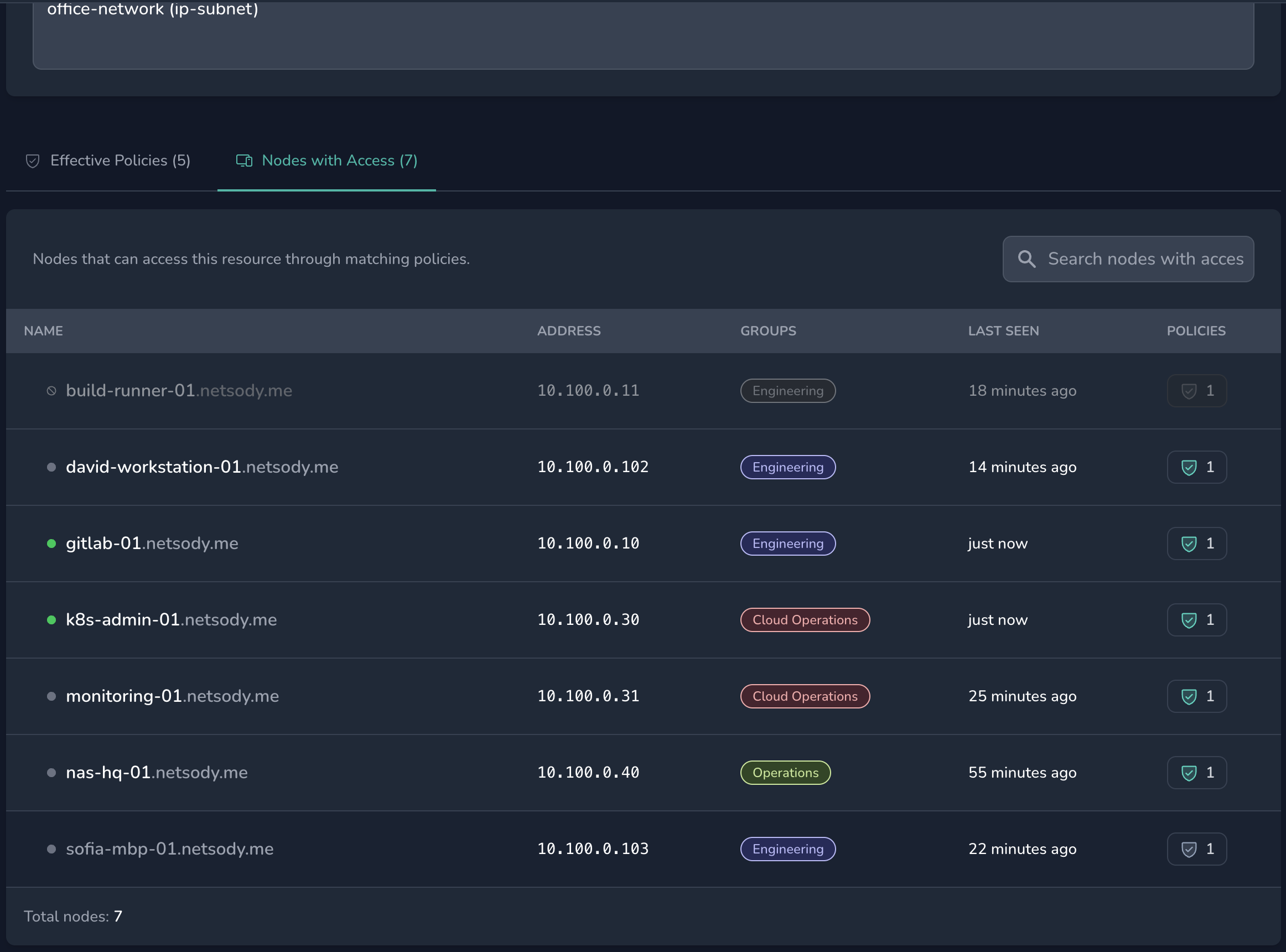
Access that a policy condition currently holds back is listed as well, marked as inactive instead of being left out. An empty list can therefore only mean that no policy grants access. The list can be searched and filtered by access state. The Effective Policies tab next to it lists the policies that bear on the resource.
The page also warns when the gateway of a resource is disabled, because such a resource is unreachable even though its policies still permit access.
The node details page follows the same model. Resources and nodes that a policy grants but a condition currently blocks are listed with each condition’s verdict, and a disabled node shows the access it would have once it is enabled again.
Also in the Dashboard
- Node groups follow their owner: A new network setting puts every node on exactly the groups of the user who owns it, managed on the Users page instead of per node. It is off by default.
- Node ownership: The users list shows how many nodes each user owns in the network, and the nodes list can be filtered with
owner:,has:owner, andis:unowned. - Online status: Disabled nodes, and resources behind a disabled gateway, are no longer shown as online.
- Network descriptions: Images in a network description are no longer loaded automatically, so opening a network cannot trigger requests to third-party servers.
- New networks: The suggested subnet no longer overlaps a network you are already in.
Also in rc.4
- Windows: Fixed a device reporting
Connection: ConnectedandErrors: Nonewhile being unable to create a network device at all, becausewintun.dllwas not there. - Windows:
netsody service restartnow works.
Try it
Install the latest release at my.netsody.io/install. The complete list of changes is in the release notes.
If something doesn’t work the way you expect, create a support bundle with netsody bundle create, upload it with netsody bundle upload, and send us the bundle ID on Discord or at oi.ydosten@olleh.